 跳转到主要内容 跳转到页脚

A static retail display is the single biggest point of failure for moving high-margin car fridges off the showroom floor. Customers can’t hear the compressor, feel the weight of a fully stocked unit, or interact with a live digital screen, which forces them to guess about critical features. This uncertainty leads directly to purchase hesitation and an increase in costly product returns when the real-world experience doesn’t match their assumptions.
This guide provides the standard operating procedures for creating an interactive showroom experience that drives sales. We will detail how to activate the screen-only demo mode to showcase the user interface without running the motor. We also cover practical methods for simulating a ‘full load’ lift, demonstrating the unit’s operational silence, and using point-of-sale materials to answer key customer questions before they have to ask.
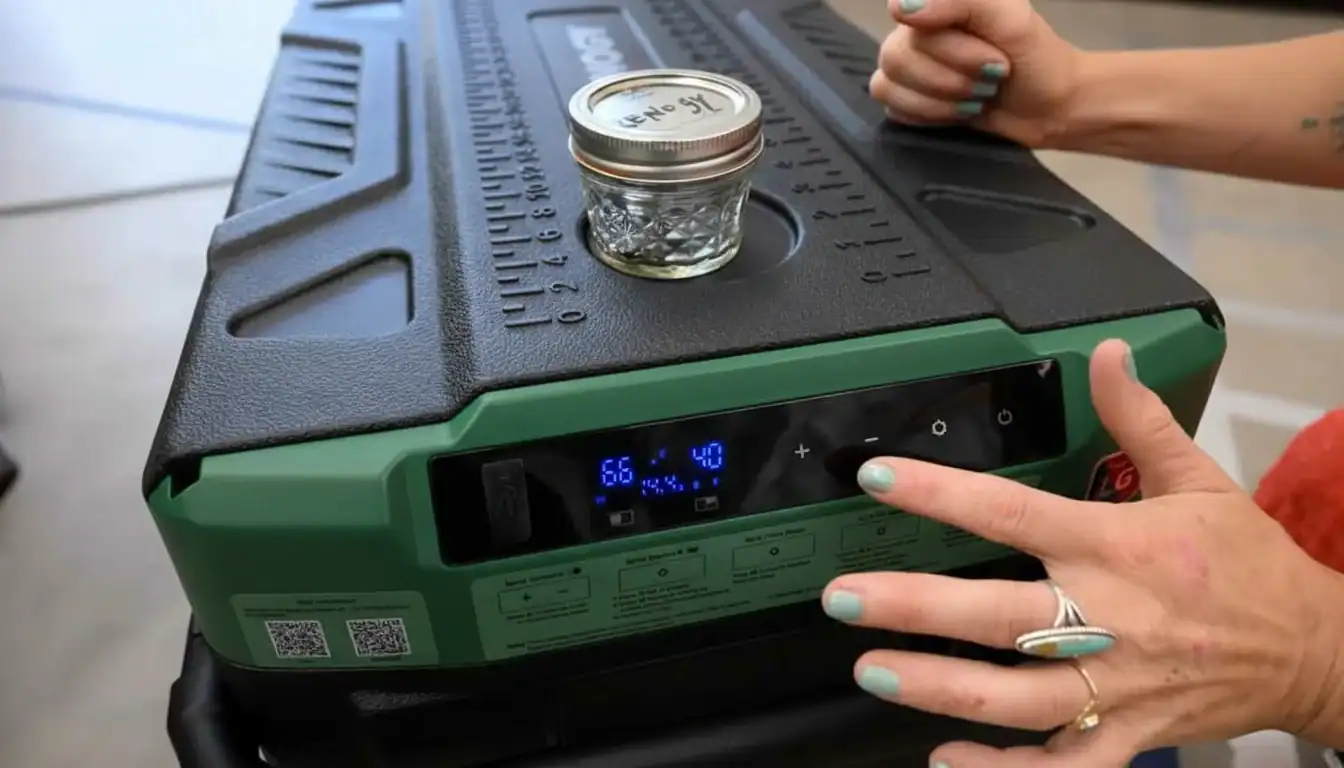
Demo Mode: How to Light Up Screens Without the Motor?
A retail demo mode must deliver an engaging user experience without activating the product’s core, energy-intensive functions like the compressor motor.
To effectively showcase a car fridge or cooler in a retail setting, the display needs to be active and appealing without running the cooling system 24/7. This is accomplished through a dedicated “shop mode” that isolates power to the user interface. Modern systems rely on low-draw components to light up screens and controls, giving customers a full interactive experience while consuming minimal energy. This approach prevents unnecessary wear on the compressor and keeps operational costs down for the retailer.
Powering Displays with Low-Energy LEDs
LED technology is the industry standard for retail displays. It consumes very little power, making it the perfect solution for running a demonstration mode continuously. These systems can illuminate product screens and control panels to highlight features like temperature settings or battery levels, all while being electrically separate from the main compressor motor. Dynamic and programmable LEDs add another layer, creating visual effects that attract shoppers and make the product stand out on a crowded shelf. This method is both cost-effective and efficient for maintaining an active display without running the core function of the unit.
| Display Feature | Traditional Backlight (Outdated) | Modern LED System (KelyLands Standard) |
|---|---|---|
| Energy Consumption | High; generates excess heat | Very low; minimal heat output |
| Operational Lifespan | 10,000 – 15,000 hours | 50,000+ hours |
| Customer Interaction | Passive (Always on) | Can be integrated with sensors for active engagement |
Using Motion Sensors for On-Demand Activation
Motion sensors offer a smarter way to manage display energy. The unit’s screen can remain in a low-power sleep state until a customer walks by, triggering it to light up. This on-demand activation creates an interactive moment that grabs attention far more effectively than a constantly-on display. It strikes a practical balance between the need for an engaging presentation and the reality of energy conservation in a retail environment. When the screen wakes up as a customer approaches, it encourages them to stop and interact with the product controls.
Alternative Screen Tech for Specialized Displays
For specific retail environments, like brightly lit showrooms or enclosed displays, other screen technologies can be more effective. Reflective LCDs use ambient store lighting to illuminate the screen, which dramatically cuts power consumption by eliminating the need for a backlight. Transparent LEDs are another option, allowing for innovative designs where the display is integrated directly into a glass surface, such as the lid of a cooler. These technologies are especially practical for enclosed units where a standard backlight would be inefficient or produce unwanted heat, solving a key problem for displaying refrigerated products.
POS Materials: Do Headers and Stickers Drive Sales?
With over 70% of buying decisions made in the aisle, well-designed Point of Sale materials are not just marketing fluff—they are a primary driver of in-store conversions.
The data is consistent: between 73% and 76% of all purchase decisions happen while the customer is physically in the store. This makes the checkout counter, aisle endcaps, and product shelves the final, most critical battleground for winning a sale. Effective POS materials like headers, shelf talkers, and strategically placed stickers are proven to lift impulse buys and directly improve profit margins by capturing attention at the exact moment of decision.
Combining Physical and Digital Displays
The market is moving past simple cardboard cutouts. The most effective current strategy is a hybrid approach that merges traditional, static signage with dynamic digital screens. Retailers now pair printed stickers and headers with interactive kiosks or small LED displays. This integrated method captures customer attention far more effectively than static materials alone and gives retailers the flexibility to push real-time updates for promotions or time-sensitive campaigns.
Key Strategies for POS Campaigns
Successful POS campaigns depend on more than just good graphics. They require a clear strategy focused on placement, branding, and measurement to ensure they translate attention into action. For any materials you develop, focus on these core objectives:
- Target High-Traffic Zones: Place displays in areas with maximum footfall to capitalize on impulse buys and support seasonal campaigns. The path to the register is prime real estate.
- Maintain Brand Consistency: All POS materials must use the same logos, colors, and messaging. This reinforces your brand identity and builds the trust that leads to customer loyalty.
- Measure Engagement: Don’t just guess if a display is working. Track its effectiveness through modern metrics like QR code scans for exclusive content or by analyzing customer dwell time near the display.
Source High-Quality, Fully Customized Car Coolers

The “Sound” Test: Is There a Button to Demo Silence?
While a dedicated “silence button” for a car fridge isn’t a standard retail feature, the principle of interactive audio demos is a proven tool for showcasing a product’s acoustic performance and building customer trust.
A key selling point for high-end compressor fridges is their quiet operation, especially in Eco Mode. For thermoelectric coolers, it’s the complete lack of vibration. The challenge is communicating this sensory benefit in a noisy retail store. The best way to sell silence is to let the customer hear it, but this requires a controlled environment or a clever point-of-sale display. While not common for appliances, the consumer electronics industry provides a solid blueprint for how to execute this effectively.
How Audio Demos Work in Retail Displays
Interactive point-of-sale displays often use button-activated sound modules to give customers a real-time sample of a product’s audio signature. This direct experience builds shopper confidence by offering an authentic preview of performance. For a product like a quiet fridge, a display could isolate the sound of the compressor kicking in, allowing a direct comparison to ambient store noise. This technology is already mature and widely used for headphones and speakers.
- Modules are integrated directly into shelving or promotional stands.
- A simple button press triggers the sound demonstration.
- This approach transforms a technical specification (like a decibel rating) into a tangible experience.

Materials and Durability for High-Traffic Use
Any interactive display must be built to withstand constant use in a busy retail environment. The design prioritizes durability to ensure it functions reliably over time. Robust materials are non-negotiable, as a broken display is worse than no display at all.
- Common materials include sturdy acrylic, metal, and high-impact plastics.
- LED lighting is often used to highlight the product and draw attention to the interactive button.
- The internal components are engineered for repeated customer interaction without failure.
Customization and Power Efficiency
Display manufacturers provide modular audio solutions that can be tailored to specific brand aesthetics and product requirements. These systems are designed for efficient battery use, ensuring they remain functional on the sales floor for months without maintenance. This is critical for large-scale retail rollouts where frequent battery changes are not practical.
- Audio modules can be customized to fit unique display shapes and sizes.
- The system’s design focuses on low power consumption for long battery life.
- Solutions can be tailored to match brand identity and highlight key product features.

Lift Experience: Should We Add Weights to Simulate Usage?
Adding weights to a retail display to simulate a “lift experience” for customers misses the point; the industry’s focus is correctly placed on static load testing to prevent structural failure and ensure safety.
The idea of adding weights to a portable fridge display so a customer can feel its “real” weight is a common but misguided request. In practice, the structural integrity of the point-of-sale display itself is the only engineering concern. Adding weights for simulation introduces unnecessary complexity and liability without providing real value. The focus should remain on safety and stability, not on replicating a hands-on user scenario in a retail setting.
Assessing Load Capacity Before Deployment
Standard industry practice prioritizes safety through verification. Before deploying any display, you must calculate the total weight of the products and packaging it will hold. This calculation serves as a baseline requirement. You then consult with the display designers to confirm its structural specifications can handle the intended load. This isn’t just a suggestion; it’s a critical step to prevent collapses that could lead to product damage or injury.
Key Design Considerations for Structural Integrity
The ability of a display to bear weight is determined by its design, not by chance. Engineers use specific techniques like reinforced corners and double-walled construction to increase rigidity and durability. Another crucial factor is weight distribution. Spreading the load evenly across shelves and the base structure is fundamental to maintaining stability and preventing weak points from failing under stress.
| Testing Approach | Primary Goal | Practical Application |
|---|---|---|
| Simulated Lift Experience | Mimic a customer lifting the product. | Not a valid engineering test for displays. Creates potential liability and instability. |
| Static Load Testing | Confirm the maximum weight capacity to prevent failure. | The industry standard for validating display safety, stability, and compliance. |
Focus on Static Load Testing for Safety
The only reason to use weights when evaluating a display is to perform a static load test. This process determines the maximum weight a display can safely hold over time without buckling or breaking. It’s about validating engineering limits for displaying products, not about creating an interactive experience. While the idea of a “lift experience” sounds appealing from a marketing perspective, it introduces risks and deviates from the core engineering goal: ensuring the display is safe for both the products and the people in the store.
Conclusion
A thoughtful showroom setup allows customers to experience key features firsthand. Lighting up the display without running the motor, demonstrating the quiet compressor, and adding weight to the lid helps build trust. An interactive display directly translates to better customer understanding and increased sales.
If you are planning a new product display, ask your account manager for our latest point-of-sale catalog. We can provide custom headers and specification tags to support your merchandising goals.
Frequently Asked Questions
Does the fridge have a retail demo mode?
Yes, our fridges are equipped with a retail demo mode. This feature is designed specifically for showroom display, allowing the unit to power the internal LED lights and digital control panel without engaging the compressor. This provides an excellent customer experience while conserving energy and minimizing wear on the cooling components.
Do you provide point-of-sale (POS) display materials?
Absolutely. We support our retail partners with a comprehensive kit of point-of-sale (POS) materials. This typically includes high-resolution product brochures, feature callout cards, branded floor mats, and digital assets for use on in-store screens. Custom materials may also be available for high-volume partners.
How to set up a product display for camping fridges?
To create an effective camping fridge display, focus on context and interactivity. Position the unit in a high-traffic area with access to power. Stage it with related gear like camping chairs or recovery equipment to create an authentic outdoor scene. Use dynamic LED spotlights to highlight key features and ensure the interior is well-lit. Finally, make the unit accessible so customers can open the lid, interact with the controls, and appreciate its build quality.
What are the key selling points for a showroom tag?
A showroom tag should be concise and impactful. Focus on the top 4-5 features that solve customer problems. We recommend highlighting:
• Capacity: e.g., “50L Capacity / Holds 72 Cans”
• Cooling Performance: e.g., “Dual-Zone Fridge & Freezer”
• Power Efficiency: e.g., “Ultra-Low 1.2A Power Draw”
• Durability: e.g., “Reinforced Steel Construction”
• Smart Tech: e.g., “Bluetooth App Control”

 English
  Español
  Français
  Deutsch
  Português do Brasil
  Русский
  한국어
한국어  日本語
日本語  العربية